3D Layered Sea Shells V3: Digital Cut Files
Creating intricate paper art or detailed laser projects often requires hours of design work before you even begin cutting. The 3D Layered Sea Shells V3 collection eliminates that preparation time by providing professionally structured, multi-layered designs ready for immediate production. This digital download is specifically engineered for crafters, small business owners, and designers who need high-quality marine-themed assets without the technical headache of vectorizing complex organic shapes from scratch.
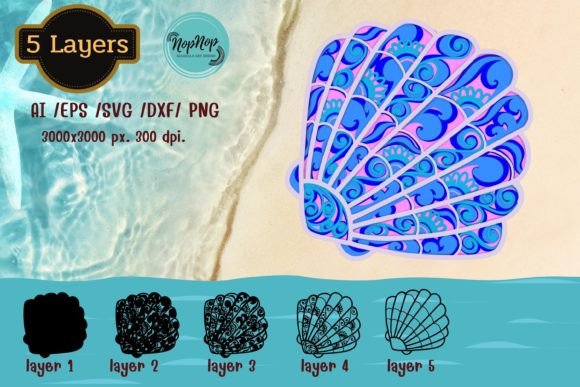
At its core, this collection offers five distinct shell designs optimized for depth and dimension. Unlike standard flat clipart, these files are separated into individual layers that stack to create a realistic three-dimensional effect. Whether you are using a Cricut Maker, Silhouette Cameo, Glowforge laser cutter, or professional Adobe Illustrator software, the files are formatted to maintain precision across different platforms. The generous artboard size of 3000 × 3000 pixels at 300 DPI ensures that your projects remain crisp and detailed, whether you are printing them as wall art or cutting them from cardstock for shadow boxes.
Versatile Applications for Crafters and Businesses
The primary appeal of the 3D Layered Sea Shells V3 set lies in its adaptability across various creative disciplines. For hobbyists and beginners, these files serve as an excellent introduction to layered paper crafting. Because the vectors are already cleaned and organized, users can focus on material selection and assembly rather than troubleshooting jagged lines or disconnected nodes in their cutting software. This makes it significantly easier to achieve professional-looking results on the first attempt.
Small business owners and entrepreneurs will find particular value in the commercial viability of these designs. They are ideal for creating unique product lines such as coastal wedding invitations, nautical nursery decor, beach-themed greeting cards, or custom cake toppers. The ability to cut these designs from different colored papers allows for endless customization without needing to purchase new digital assets for every color variation. Educators and camp counselors can also utilize these shells for marine biology lessons or summer craft activities, providing students with tangible, artistic representations of ocean life.
Beyond physical cutting, the included high-resolution PNG files open doors for digital and print applications. While the actual cut file PNGs are black silhouettes designed for machine recognition, the separate colored PNG files are perfect for sublimation printing, sticker making, or digital scrapbooking. This dual functionality means a single purchase supports both your vinyl/paper cutting workflow and your print-on-demand or digital design needs.
Understanding File Formats and Compatibility
Navigating digital downloads can be confusing if you are unsure which format your specific machine or software requires. This collection is packaged in a single ZIP file containing five layered designs, but understanding what is inside helps streamline your workflow. The inclusion of AI and EPS files caters to professional designers using Adobe Illustrator, Corel Draw, Inkscape, or Make the Cut. These vector formats allow for infinite scaling and node editing, giving advanced users total control over the artwork.
For the vast community of electronic cutting machine users, the SVG and DXF formats are the workhorses of this package. SVG files are compatible with Cricut Design Space, Silhouette Designer Edition, and ScanNCut Canvas. These files preserve the layering information, meaning when you upload them, the separate pieces of the shell remain grouped and aligned. DXF files are particularly useful for older Silhouette Basic Edition users or those working with certain laser software that prefers this exchange format. Glowforge users will appreciate the optimized vectors that translate cleanly into laser engraving or cutting paths.
It is important to clarify the role of the PNG files included in this download to avoid confusion. You will receive two types of raster images. The first is a black silhouette PNG; this is strictly a reference or cut-line file and does not contain color data. The second type is a full-color PNG rendered at 300 DPI. These colored versions are intended for printing, clipping, or digital use. If you intend to cut colored shells from paper, you should rely on the SVG/DXF files and select your paper colors manually, rather than trying to print-and-cut the colored PNGs unless that is your specific intent.
Practical Tips for Successful Layered Projects
Achieving the best results with 3D Layered Sea Shells V3 involves more than just hitting the "cut" button. Material choice plays a significant role in the final aesthetic. Since these are layered designs, using paper of varying weights and textures adds authentic depth. Consider using a heavier cardstock (80lb to 100lb) for the base layers to provide structural integrity, while lighter text-weight paper can be used for the top detail layers to prevent the finished piece from becoming too bulky. Experimenting with pearlescent, metallic, or textured papers can mimic the natural iridescence of real sea shells far better than standard solid colors.
Adhesive selection is equally critical for 3D paper art. Liquid glues can cause paper to warp or wrinkle, especially on delicate shell details. Foam tape or silicone glue dots are often superior choices for assembling layered projects because they add physical space between the layers, enhancing the three-dimensional effect that gives this collection its name. If you are using a laser cutter like a Glowforge, test your settings on scrap material first. Organic shapes like shells have many curves and points; ensuring your power and speed settings are dialed in prevents scorch marks on the delicate edges.
For those planning to sell finished goods, remember that the backgrounds shown in any listing photos are for demonstration purposes only and are not included in the download. Your creativity provides the backdrop. This distinction is vital for managing expectations and planning your photography or staging. The clean, transparent nature of the provided files ensures they integrate seamlessly into whatever background or setting you choose to create.
Important Considerations Before Downloading
Before adding 3D Layered Sea Shells V3 to your library, verify that your equipment meets the necessary requirements. Ensure your cutting software is updated to the latest version to properly read SVG and DXF layering data. If you are a beginner, check online tutorials specific to your machine regarding "layered SVGs" to understand how to manipulate individual layers within your software interface. Having this foundational knowledge will make the transition from digital file to physical object much smoother.
Also, consider your storage and organization habits. Since this is a digital-only product delivered as a ZIP file, you will need to extract the contents immediately upon download. Organizing these files into clearly labeled folders on your computer or cloud storage prevents future frustration. Keeping the original ZIP file as a backup is also recommended in case you accidentally corrupt or delete individual design files during experimentation.
Finally, recognize that while these files are high-quality and versatile, they are tools meant to support your vision. The 3000 × 3000 pixel artboard provides ample space, but you may need to resize designs depending on your specific project constraints. Always measure your target area—whether it is a shadow box frame, a cake tier, or a greeting card front—before sending the job to your cutter or printer. By understanding both the technical specifications and the creative potential of these layered shell designs, you can maximize the value of this digital asset and produce stunning, professional-grade coastal creations with confidence.